
Ctrl+K
UB MTH - Home

Remote Course Overview

  • Overview
  • Class Pacing
  • Lecture Video Pacing
  • Assessments

Exam & Quiz Proctoring

  • Proctoring Overview
  • Exam Integrity
  • Updates
  • Zoom Links
  • Exam Delivery

UB Learns

  • Course Setup
  • Course Packages
  • Nav-bar changes
  • Homepage Changes
  • Adding Content
  • Activate Course

WeBWorK

  • Course Setup
  • Importing Sets
  • Changing Due Dates
  • Importing Students
  • Assigning HW

Video and Note Links

  • 121 Calculus & Applications 1
    • Chapter 0
    • Chapter 1
    • Chapter 2
    • Chapter 3
    • Chapter 4
    • Chapter 5
    • Chapter 6
  • 122 Calculus & Applications 2
    • Chapter 7
    • Chapter 9
    • Chapter 10
    • Chapter 12
  • 131 Mathematical Analysis for Management
    • Chapter 1
    • Chapter 2
    • Chapter 3
    • Chapter 4
    • Chapter 5
    • Chapter 6
    • Chapter 7
  • 141 College Calculus 1
    • Chapter 1
    • Chapter 2
    • Chapter 3
    • Chapter 4
    • Chapter 5
  • 142 College Calculus 2
    • Chapter 5
    • Chapter 6
    • Chapter 7
    • Chapter 8
    • Chapter 10
    • Chapter 11
  • 241 College Calculus 3
    • Chapter 12
    • Chapter 13
    • Chapter 14
    • Chapter 15
    • Chapter 16
  • .md

Nav-bar changes

Contents

  • What to change
  • How to make changes

Nav-bar changes#

The UB Learns blue navigation bar will appear near the top of your browser window. You should edit this nav-bar to include all heavily used links and to remove any unused items. Below is an example of the customized nav-bar I used in Winter 2025.

homepage

What to change#

  1. Remove any links you will not be using. I personally remove the following default links:

    • Classlist

    • Class Progress

    • Grades? (For my own course, I do not use the UB Learns gradebook, all grades are available on either Gradescope or WeBWorK.)

    • Assessments? (While I usually do remove this, in can be helpful for yourself to leave it in.)

  2. Add any new links your students will (hopefully) be using more:

    • (HW) WeBWorK

    • Help Forum

    • Gradescope

How to make changes#

  1. Hover over the 3 dots which appear towards the right end of your nav-bar.

  2. Click on “Edit This Navbar”

  3. Remove an item by hovering over it and then selecting the “x” that appears.

  4. Add a link by clicking on Add Links > Create Custom Link
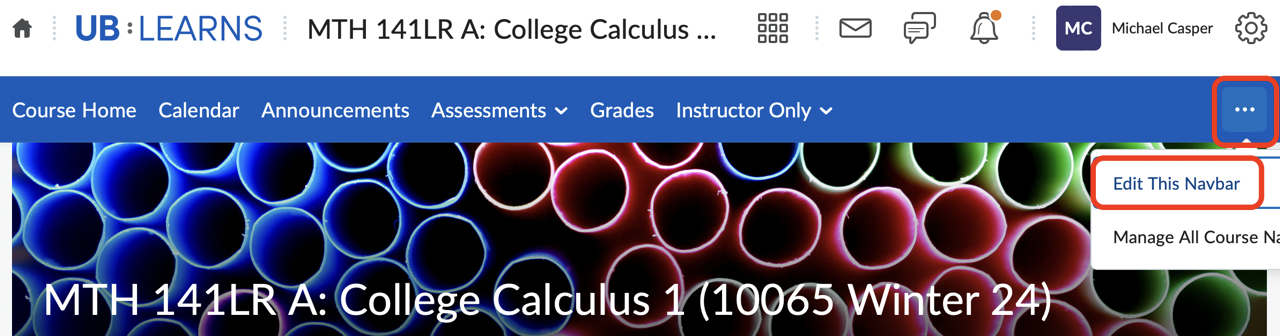
Navigation Edit

previous

Course Packages

next

Homepage Changes

Contents
  • What to change
  • How to make changes

By UB Math

© Copyright 2022.